Emergency stop
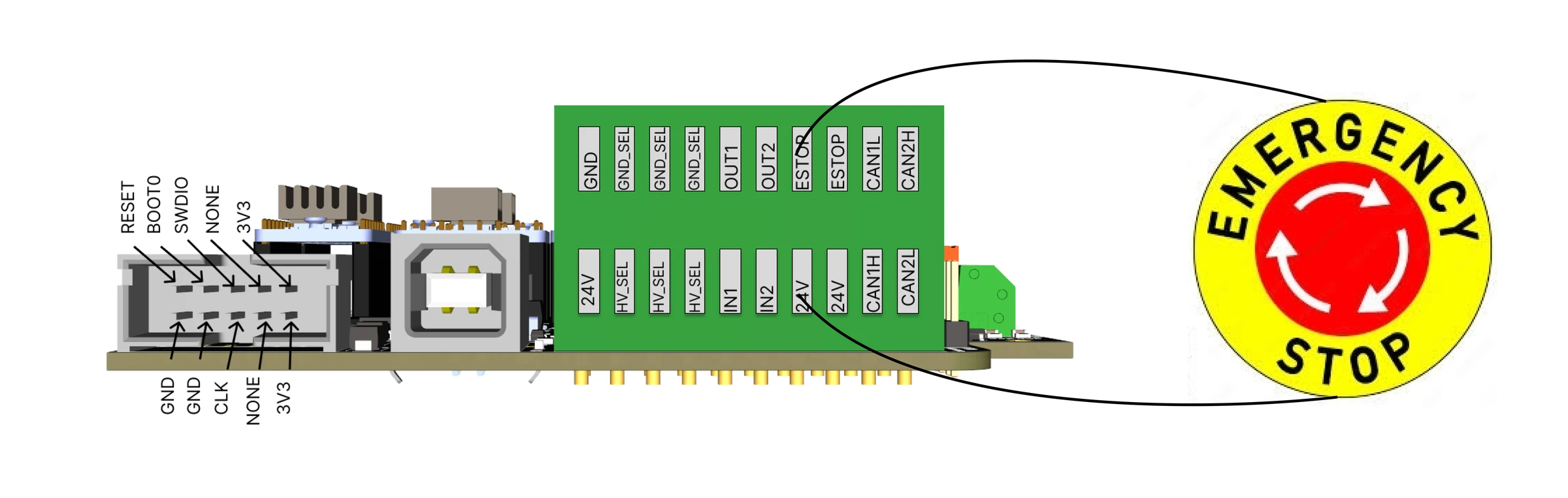
The E-stop is the red button on the base, a normally closed contact wired to the control board's E-stop input. It must be connected for the robot to run.
What pressing it does
The control board reads the E-stop input in every command cycle and reports it to the PC in every packet. The PC software acts on it:
- the commander software disables the robot: it sends the disable command, the firmware stops accepting motion commands, and the log shows Robot disable; button or estop. A running program is stopped. The motors stay energised and hold the arm. Release the button and press Enable to continue; Start runs a program again from its first line.
- the Python API's controller cancels the move in progress and the queue, sends the disable command to the
firmware, and refuses every motion command with
SYS_ESTOP_ACTIVEwhile the button is pressed. When the button is released, the controller clears that error by itself and accepts commands again, but the firmware stays disabled and the arm does not move untilreset()sends the enable command. Callreset()after every E-stop, before the next move.
The E-stop is a software stop
The control board's firmware (release 1) reports the E-stop and does not itself cut the motor power or the step pulses: the PC software stops the motion. A PC that has crashed, a program that has frozen, or a USB cable that has fallen out leaves the E-stop without effect, and the firmware keeps executing the last packet it received: a joint that was jogging in the commander keeps turning until it reaches its blocker. For those cases the hard stop is the power supply: a switch on the supply's mains side within reach, and the knowledge that the arm will fall when you use it.
What it does not do
- It does not cut power to the motors, so the arm does not fall when it is pressed.
- It does not stop the gripper: an electric gripper keeps its grip, a pneumatic one stays where the valve left it.
- It does not stop a Python script of your own: the script keeps running. Its commands are refused while the
button is pressed and accepted again after the release, before the arm can move. Stop the script before you
release the button, then call
reset().
If someone is caught by the arm
The E-stop does not free anyone
Pressed, the E-stop leaves the motors holding the arm where it is, and a joint cannot be pushed back by hand against a holding motor. To free a trapped hand or finger, either release the E-stop, enable the robot and jog that joint away slowly, the smallest step at a time; or support the arm with one hand and switch off the power supply with the other, knowing that the arm goes limp and falls. Decide which before you need it, and keep the supply's switch within reach (Planning the cell).
The contact
Normally closed, so that a cut wire, a loose terminal or an unplugged button is read as a stop. A normally open button does not work. The control board has two E-stop connectors on the same input: a second button can be wired in series, or a safety relay's contact. Inputs, outputs and E-stop has the wiring.
Comments
Found a mistake on this page? Edit it on GitHub · Report it · Get help · This page as Markdown · llms.txt · The whole manual as PDF