UART interface
The UART interface is more interactive and user-friendly compared to CAN. With just a serial monitor and a USB-to-serial device, you can communicate with your motor and receive interactive, human-readable responses.
Disadvantages:
- Passing human-readable data is slow and limiting if you aim for high-performance control.
- Only one device per UART channel, so no daisy chaining.
- Susceptible to noise.
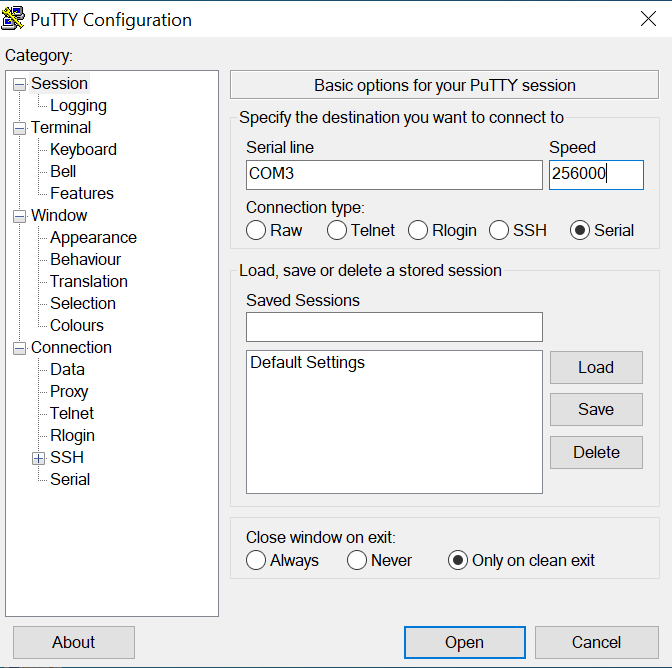
Default baud rate: 256000 (the highest tested is 1 000 000)
How to connect
Voltage warning
The STEPFOC UART port uses 3.3 V. Using 5 V will destroy the board!
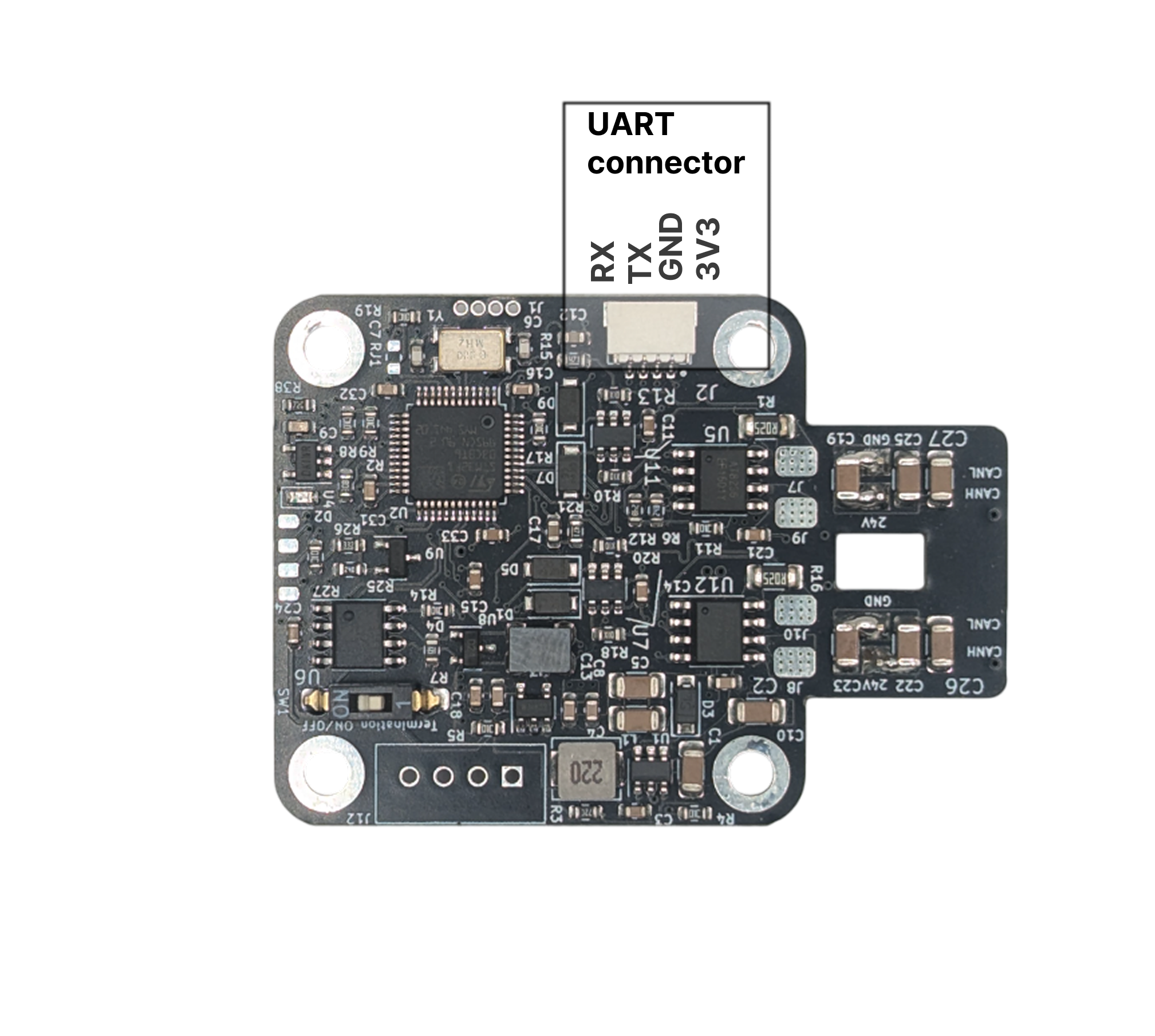
UART pins
Take note that UART is connected TX to RX and RX to TX
Using serial monitor
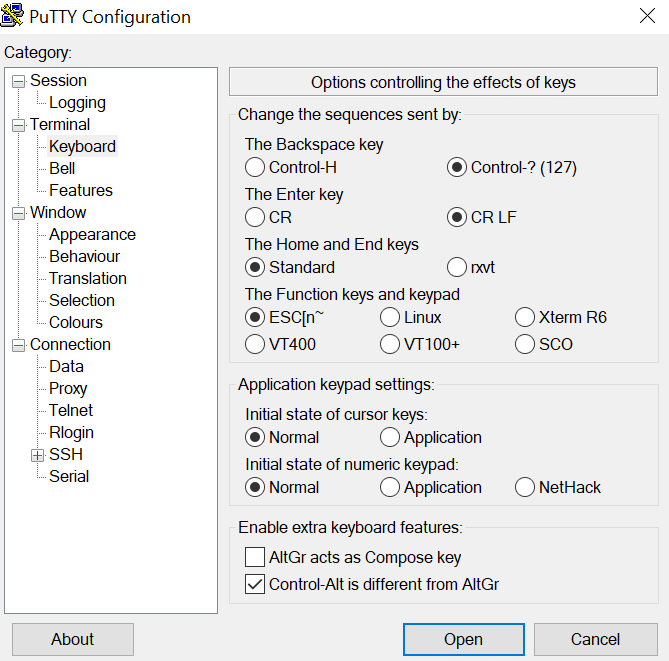
Download Putty from this link: Modified Putty
Note
You need to have Putty from above link to add CR LF option. Stock Putty can't do that!
| Step 1 | Step 2 |
|---|---|
| Go to keyboard tab and Select CR LF option | Enter serial port of your adapter and enter speed; Click Open |
|
|
Download VScode from this link: VS code Open the STEPFOC firmware in VS Code (You will need to install Platformio extension)
| Step 1 | Step 2 |
|---|---|
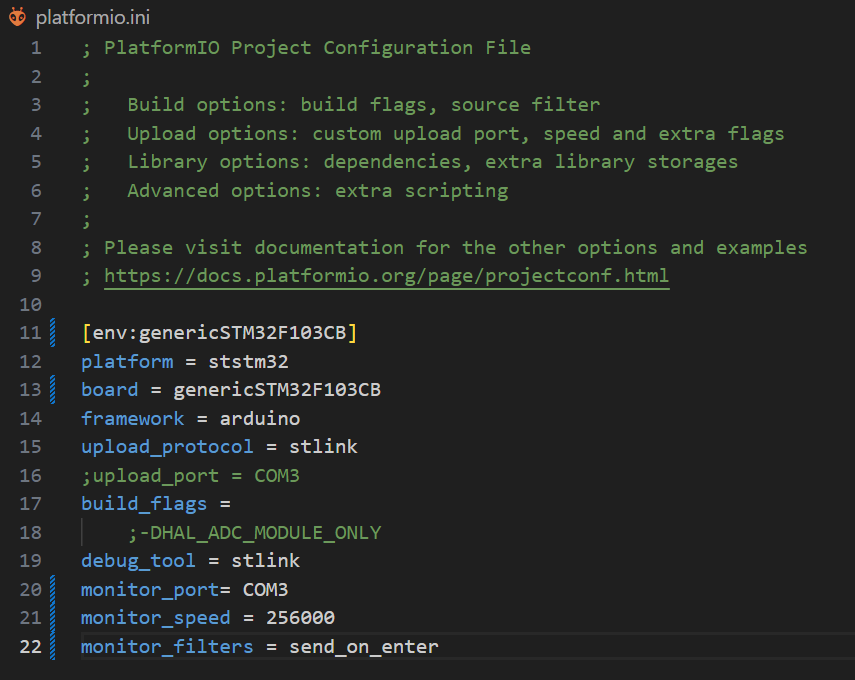
| Made sure your platformio.ini file looks like this (usually platformio will auto detect the COM port) | Click the icon marked in red and that will open a serial terminal |
|
|

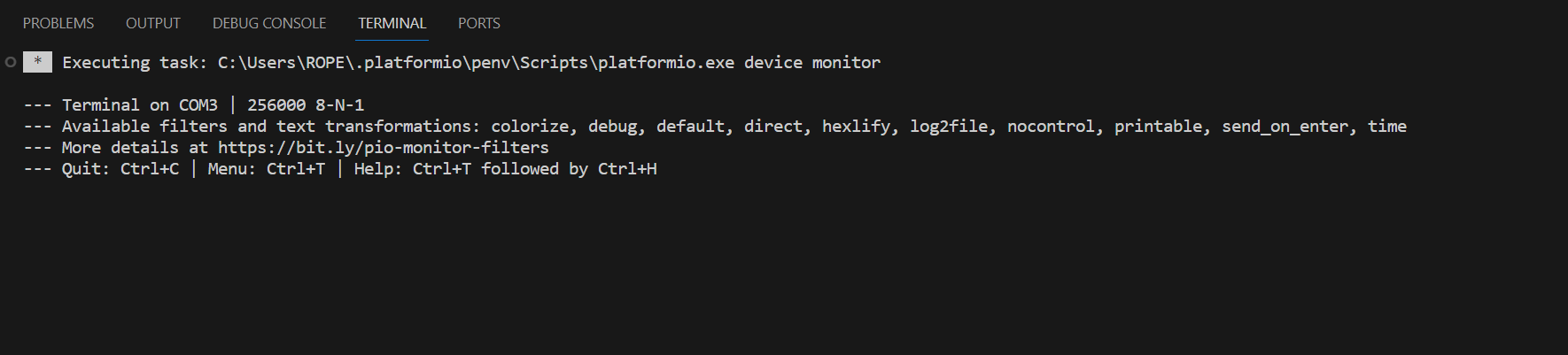
Download Arduino from this link: Arduino
Select matching COM port of your serial adapter
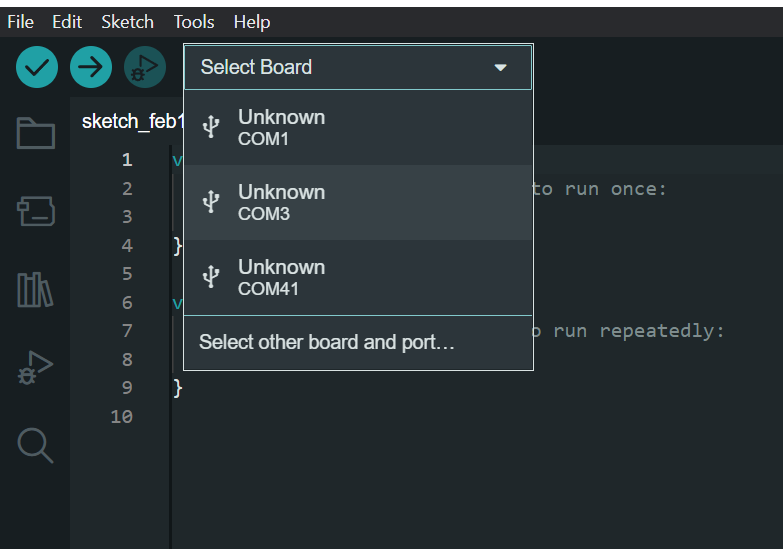
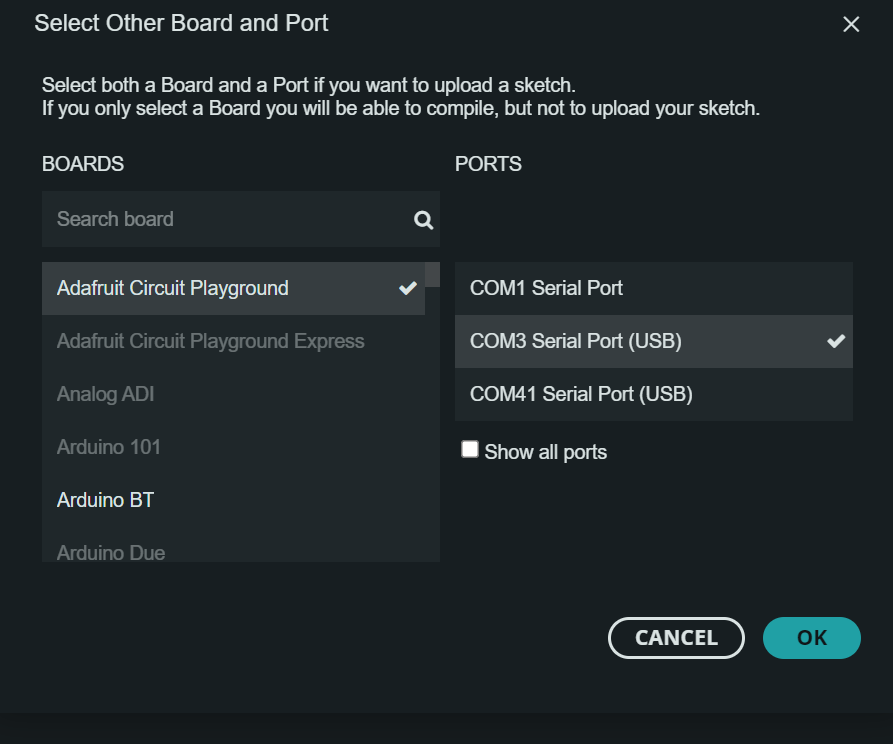
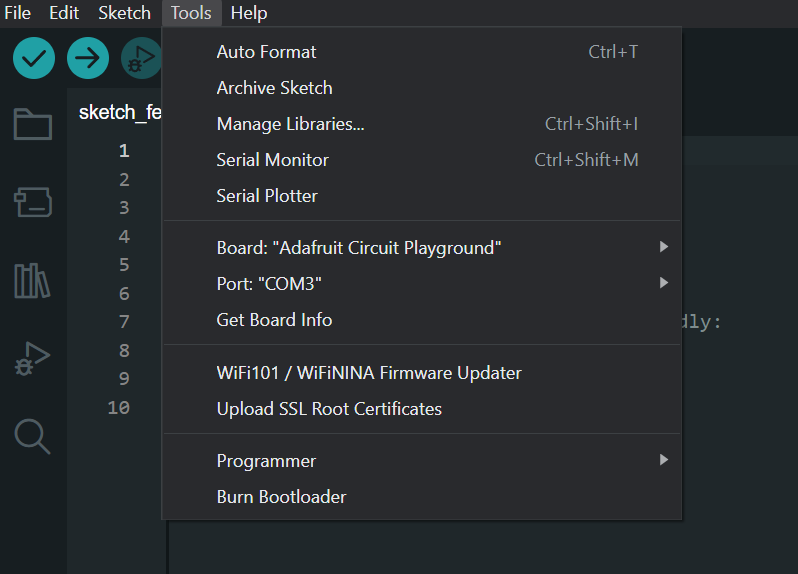
UART protocol
All commands need to start with # and end with CR + LF (carriage return \r + Newline (Line Feed) \n).
CR + LF
Usually CR + LF is inserted by the terminal you use when you press enter.
All commands are response-only; that means the motor driver will never send data over UART unless it receives a request from the host.
Cyclic commands
Only exceptions are cyclic commands that allow you to set up motor driver to periodically send some data.
After # You can enter your command. For example: #Error
Commands that are type set/get can have a number argument after command name. Number argument for command can be one of following types as described in table column "Input Data type"
- int - positive and negative integer values
- float - positive and negative float values
- bool - 0 or 1
Commands and numbers need to be separated by a single space! Example: #LED 1
Commands are case sensitive!
Command names are case sensitive and need to be same as in the table to be registered.
Template of command:
#Name number
Here are few examples:
- Calling
#P 100will set our motor to position mode with setpoint of 100 and return its current position, but calling#Pwill only return current position of the motor. - Calling
#V 1000will set motor to velocity mode with setpoint of 100 and return its current velocity, but calling#Vwill only return current velocity of the motor. - Calling
#LED 1will enable led indication on the motor and#LED 0will disable it; also both examples will return its current status. Calling only#LEDwill tell us the current status.
As you can see Responses of Set/Get commands do not change if they have number command after command name. So calling #P and #P 100 will have same response; defined in Response tab of the table.
Action commands
Commands of type action do not take any second arguments.
Cyclic commands:
There are few cyclic commands available. they initiate a motor to send data every timeinterval we set.
CycCyca
List of commands
Motion commands
| Name | Type | Input Data type | Description | Response |
|---|---|---|---|---|
Iq |
Set/Get | float | Switches actuator to current control mode and sets current setpoint to Iq value. |
Iq value [mA] |
V |
Set/Get | int | Switches actuator to velocity control mode and sets velocity to setpoint V |
Velocity value [Encoder ticks/s] |
P |
Set/Get | int | Switches actuator to position mode and sets position setpoint to P value |
Position [Encoder ticks] |
PD |
Set/Get | int | Switches actuator to Impedance PD control mode and sets position setpoint to PD value |
Current position [Encoder ticks] |
PDV |
Set/Get | int | Set/Get velocity setpoint when in Impedance PD mode. |
Current velocity setpoint when in PD mode |
PDI |
Set/Get | int | Set/Get current setpoint when in Impedance PD mode |
Current current setpoint when in PD mode |
Uq |
Set/Get | int | Switches actuator to voltage-torque mode and sets the Uq voltage setpoint [mV] |
Uq setpoint [mV] |
Ud |
Set/Get | int | Set/Get the Ud voltage setpoint [mV]; does not change the mode |
Ud setpoint [mV] |
Openloop |
Set/Get | float | Enter open loop mode and spin with speed; Example #Openloop 1000; Motor will use voltage preset given by #Openv command |
Value of open-loop speed |
gosteps |
Set/Get | int | Move the given number of steps in open loop, using #stepinterval and #microstep |
Moving for N steps |
PID tuning commands
| Name | Type | Input Data type | Description | Response |
|---|---|---|---|---|
Kpp |
Set/Get | float | Set/Get position loop Kp gain |
Current value of Kpp |
Kpv |
Set/Get | float | Set/Get velocity loop Kp gain |
Current value of Kpv |
Kiv |
Set/Get | float | Set/Get velocity loop Ki gain |
Current value of Kiv |
Kpiq |
Set/Get | float | Set/Get current loop Kp gain (Iq and Id loop) |
Current value of Kpiq |
Kiiq |
Set/Get | float | Set/Get current loop Ki gain (Iq and Id loop) |
Current value of Kiiq |
Kpid |
Set/Get | float | Set/Get Id current loop Kp gain. |
Current value of Kpid |
Kiid |
Set/Get | float | Set/Get Id current loop Ki gain. |
Current value of Kiid |
Vlimit |
Set/Get | int | Clamp velocity integrator to the value of Vlimit |
Current value of Vlimit [Encoder ticks/s] |
Ilim |
Set/Get | int | Set/Get Iq current limit |
Current value of Ilim [mA] |
Id |
Set/Get | float | Set/Get the value of Id setpoint. Usually we do not touch this and should stay at 0 |
Id value [mA] |
KP |
Set/Get | float | Set/Get KP of impedance PD loop |
Current value of KP |
KD |
Set/Get | float | Set/Get KD of impedance PD loop |
Current value of KD |
Rstint |
Set/Get | bool | Set/Get do we want to reset integral accumulators after receiving new setpoint, default is 0. |
0 if disabled 1 if enabled |
Vlim |
Set/Get | int | Voltage limit for Ud and Uq voltages [mV]; 0 means use Vbus |
Current value of Vlim [mV] |
Calibration and motor parameter commands
| Name | Type | Input Data type | Description | Response |
|---|---|---|---|---|
Cal |
Action | Start motor calibration procedure |
||
R |
Set/Get | float | Set/Get phase Resistance |
Phase Resistance [Ohm] |
L |
Set/Get | float | Set/Get phase Inductance |
Phase Inductance [H] |
PP |
Set/Get | int | Set/get Number of POLE PAIRS! |
Current number of pole pairs |
Kt |
Set/Get | float | Set/Get Kt (Torque constant) |
Current value of Kt |
KV |
Set/Get | float | Set/Get KV (motor velocity constant) |
Current value of KV |
Flux |
Set/Get | float | Set/Get flux linkage |
Current flux linkage value |
Magnet |
Action | Gets magnet status |
Good or Bad | |
Dir |
Set/Get | bool | Set/Get Dir |
Current value of Dir |
Phase |
Action | Get the phase order |
Phase order is: N | |
Cbw |
Set/Get | float | Set/Get current loop bandwidth [Hz] |
Current current loop bandwidth |
Resv |
Set/Get | int | Set/Get voltage used when looking for resistance value (Used in #Cal function) |
Current voltage used when looking for resistance |
Calpwr |
Set/Get | float | Set/Get max power that can be used during Inductance and resistance search (Used in #Cal function) |
Current calibration power |
Openv |
Set/Get | int | Set/Get voltage used during open loop operation (Used in #Cal function and when using #Openloop) |
Current open loop voltage |
Opens |
Set/Get | float | Set/Get open loop calibration speed (Used in #Cal function) |
Current open loop calibration speed |
Vp |
Set/Get | int | Set/Get phase order search voltage (Used in #Cal function) |
|
stepinterval |
Set/Get | int | Set/Get step time for gosteps open loop movement |
|
microstep |
Set/Get | int | Set/Get microstep used for gosteps open loop movement |
|
Iqoffset |
Set/Get | int | Iq that will be used to search angle offset |
|
Offset |
Set/Get | float | Theta offset (electrical angle offset found by calibration) |
Current theta offset |
Calangle |
Action | Find the theta offset automatically (the angle-offset step of #Cal on its own) |
Idle | |
Coast |
Action | Go to idle with the motor coasting (phases open) |
Coast 0 | |
Brake |
Action | Go to idle with the motor braking (phases shorted) |
Brake 1 | |
HALL |
Action | Enter HALL mode: spin at 3000 ticks/s until the sensor on ADDITIONAL2 triggers, then hold position |
HALL |
Utility commands
| Name | Type | Input Data type | Description | Response |
|---|---|---|---|---|
Idle |
Action | Set motor to idle state |
||
Save |
Action | Save current config to EEPROM |
||
LED |
Set/Get | bool | Enable disable LED status |
Current status of LED indication; 0 is off, 1 is on |
Reset |
Action | Reset the MCU |
||
Default |
Action | Load default config to EEPROM |
Note: this will rewrite all data saved in EEPROM (including serial number, hardware version, batch date...) Before using it make sure to manually backup any important data. | |
Temp |
Action | Get thermistor temperature in degrees |
Temperature in degrees | |
Term |
Set/Get | bool | Enable/disable thermistor measurement |
0 disabled 1 enabled |
Tlim |
Set/Get | int | Set/Get the temperature at which thermal error will trigger |
Be careful here value of 75 is default and it is not recommended to go higher than that unless you know you motor is rated for more |
Mode |
Action | Get current operating mode |
Operating mode (Open loop, Idle, Position control...) | |
Vbus |
Action | Get current value of Vbus |
current value of Vbus [mV] | |
Vmax |
Set/Get | int | Set/Get the Vbus voltage above which a Vbus error is raised [mV] |
Vmax in mV: N |
Error |
Action | Get current state of all errors |
List of errors | |
Clear |
Action | Clear all errors and go to idle; *NOTE: this will not clear calibration error if drive is not calibrated. |
||
Iabc |
Action | Get the motor phase currents |
Ia and Ib [mA] | |
Close |
Action | Enter closed loop mode |
||
PWM |
Action | Get value of PWM values |
Current PWM values | |
Info |
Action | Get Information about motor driver and motor |
Motor information | |
Param |
Action | Get all currently set PID parameters for every control mode |
PID parameters | |
Cyc |
Set/Get | int | Periodically send messages |
|
Cyca |
Set/Get | int | Periodically send messages arduino format |
|
CANID |
Set/Get | int | Set/Get CAN ID (can be from 0 - 15) |
Current CAN node ID |
SERNUM |
Set/Get | int | Set/Get motor controller serial number |
Current serial number of motor controller |
Calibrated |
Set/Get | bool | Set/Get motor calibration status. *NOTE: calling #Calibrated 1 will set controllers calibration status to 1 but motor controller might not be properly calibrated. To run auto calibration run #Cal command |
Calibrated or not calibrated |
Activate |
Action | Activate the controller (sets the activated flag) |
Controller activated | |
Pullconfig |
Action | Prints all motor data over serial; used for updating the Spectral motor GUI |
Motor data separated by single space char |
Gripper commands
Commands used when in gripper mode. Procedure:
- Gripper 1 (Tells our motor controller we are using it as gripper)
- Gripcal (this will calibrate the gripper)
- Gripvel x (x is value from 0 - 255; 0 being min speed 255 max speed)
- Gripcur x (x is value from 0 - 1000 [mA])
- Grippos x (x is vale from 0 - 255; 0 being fully open 255 fully closed)
| Name | Type | Input Data type | Description | Response |
|---|---|---|---|---|
Gripper |
Set/Get | bool | Set/get Am I a gripper |
Is this device gripper or not |
Gripcal |
Action | Start gripper calibration |
None | |
Grippos |
Set/Get | uint8_t | Set/get desired gripper setpoint position (from 0 to 255). Also will set gripper into GOTO mode and execute the command |
Gripper position value |
Gripvel |
Set/Get | uint8_t | Set/get desired gripper velocity setpoint (from 0 to 255) |
Gripper velocity value setpoint |
Gripcur |
Set/Get | int | Set/get desired gripper current in mA from 0 - 1000 (Note value below 150 are unstable) |
Gripper current value setpoint; to get current current value use #Iq |
Gripact |
Set/Get | bool | Set/get gripper activation bit |
Is gripper activated or not |
Gripstop |
Set/Get | bool | Set/get gripper Estop bit |
Gripper estop bit status |
Gripinfo |
Action | Print information about this gripper |
All information about gripper like: is it calibrated, status, endstop values... |
Found a mistake on this page? Edit it on GitHub · Report it