Mobile robot guide
Intro
This guide is a really simple example on how you can control mobile robot based on spectral micro BLDC drives using xbox controller!
By following this guide you will be able to make something like this: Link!
Python API
This guide leverages Spectral BLDC python API
What you will need to create a simple mobile robot is:
- 2 x spectral micro BLDC - used for 2 wheels
- Wires to connect everything up: CAN wires, Power wires
- 2 x BLDC motors
- 1 x CAN adapter
- 1 x Drill battery adapter: Example - This is great way to power your BLDC motors with cheap and affordable batteries
- A Laptop or raspberry pi
- Xbox controller
Building the robot
In this guide we only recommend you the hardware you can use to build the robot you designed. We do not offer already made designs you can build!
Setup
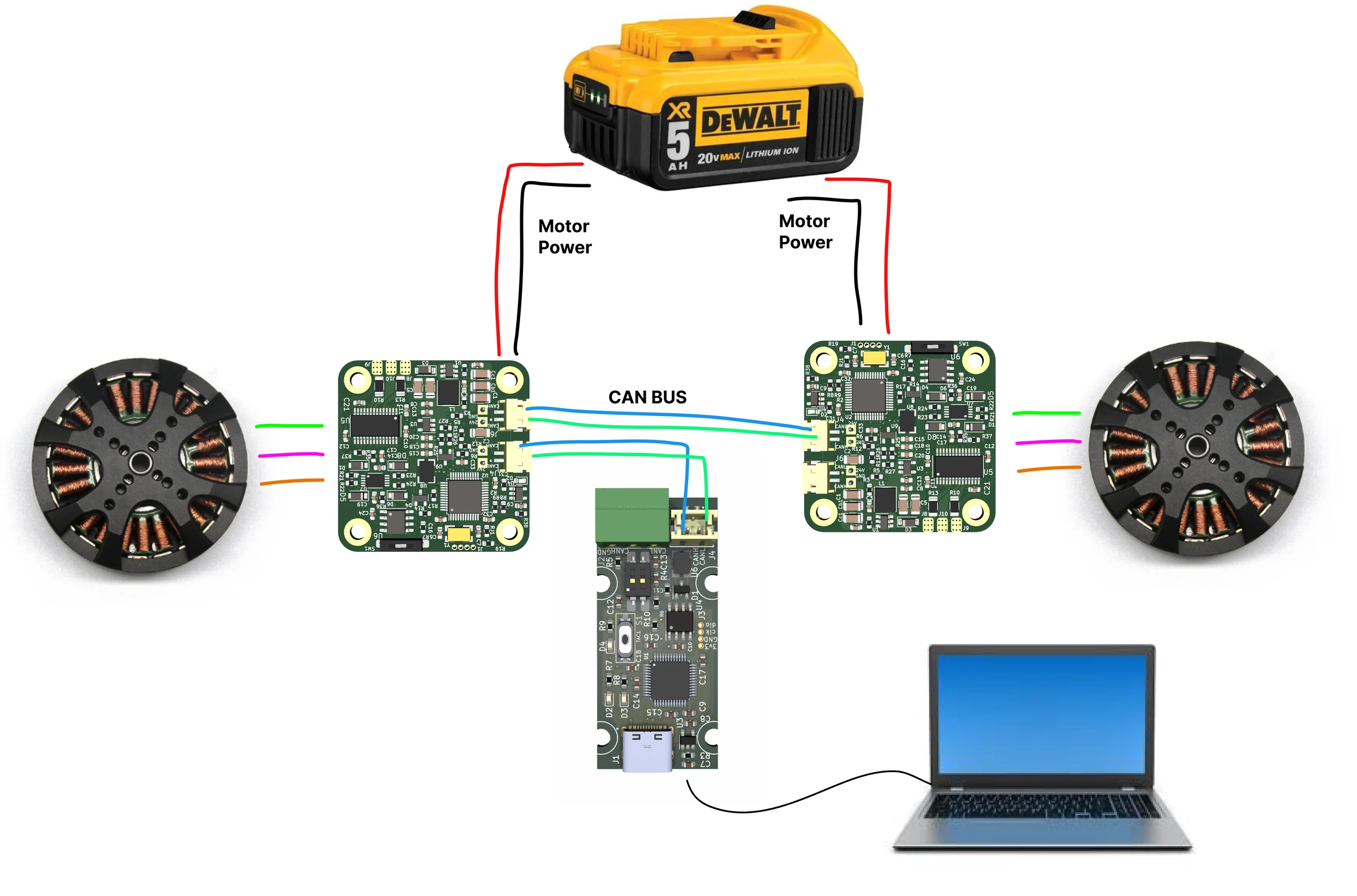
The setup will be the same for any kind of mobile robot. You will need to follow the diagram above to wire everything up.
- First you need to calibrate your Spectral BLDC drivers with the motors you are using.
- After that change the CAN ids of one of the drivers to CAN 1. You can do it by using UART commands: #CANID 1 and after that #Save
- Now connect CAN adapters CAN bus to one of the drivers and then from that driver connect to the second driver. Make sure that last driver in chain has its CAN termination resistor in "ON" state
- Connect the power to both drivers. You can daisy chain it or use 2 separate wires.
- You will also need to connect your xbox controller to the PC/laptop via Bluetooth.
The code below is really simple example that drives the robot using the left joystick of the controller. It sets
a watchdog on both drivers, so the wheels stop if the program or the laptop stops; clear the watchdog error
(#Clear or Send_Clear_Error) before the next run, as the code does at its start.
from inputs import get_gamepad
import math
import threading
import time
import Spectral_BLDC as Spectral

Communication1 = Spectral.CanCommunication(bustype='slcan', channel='COM3', bitrate=1000000)
Motor = []

# We are using 2 motors with IDs 0 and 1
Motor.append(Spectral.SpectralCAN(node_id=0, communication=Communication1))
Motor.append(Spectral.SpectralCAN(node_id=1, communication=Communication1))

# Stop the wheels when this program stops sending: a watchdog of 500 ms on each driver.
# Every Send_data_pack_1 below resets it; if none arrives for 500 ms, the driver stops the motor.
for m in Motor:
    m.Send_Clear_Error()
    m.Send_Watchdog(500)

timeout_setting = 0.00005

MAX_JOY_VAL = math.pow(2, 15)
DEADBAND_THRESHOLD = 0.1

# Read xbox controller and output left joystick x and y positions
def read_left_joystick():
    left_joystick_x = 0
    left_joystick_y = 0

    def monitor_left_joystick():
        nonlocal left_joystick_x, left_joystick_y
        while True:
            events = get_gamepad()
            for event in events:
                if event.code == 'ABS_Y':
                    left_joystick_y = event.state / MAX_JOY_VAL  # normalize between -1 and 1
                elif event.code == 'ABS_X':
                    left_joystick_x = event.state / MAX_JOY_VAL  # normalize between -1 and 1

                  # Apply deadband
                if abs(left_joystick_x) < DEADBAND_THRESHOLD:
                    left_joystick_x = 0
                if abs(left_joystick_y) < DEADBAND_THRESHOLD:
                    left_joystick_y = 0

    monitor_thread = threading.Thread(target=monitor_left_joystick)
    monitor_thread.daemon = True
    monitor_thread.start()

    while True:
        yield left_joystick_x, left_joystick_y

# Robot control
def control_robot():
    for x, y in read_left_joystick():
        # Assuming the robot has two wheels and speed can be controlled independently
        left_wheel_speed = y + x
        right_wheel_speed = y - x

        # Limit the speed between -1 and 1
        left_wheel_speed = max(min(left_wheel_speed, 1), -1)
        right_wheel_speed = max(min(right_wheel_speed, 1), -1)

        # Use the calculated speeds to control the robot's wheels
        print("Left Wheel Speed:", left_wheel_speed)
        print("Right Wheel Speed:", right_wheel_speed)

        # Send data to all motors
        Motor[0].Send_data_pack_1(None,int(left_wheel_speed * 1000000),0)
        Motor[1].Send_data_pack_1(None,int(right_wheel_speed * -1000000),0)

        for i in range(1, 4):  # read up to 3 replies
            message, UnpackedMessageID = Communication1.receive_can_messages(timeout=timeout_setting)
            print(f"unpack{i} is: {UnpackedMessageID}")

            # Check if UnpackedMessageID is not None
            if UnpackedMessageID is not None:

                Motor[UnpackedMessageID[0]].UnpackData(message,UnpackedMessageID)
                print(f"Motor {UnpackedMessageID[0]}, speed is: {Motor[UnpackedMessageID[0]].speed}")

        time.sleep(0.05)

if __name__ == '__main__':
    control_robot()
Comments
Found a mistake on this page? Edit it on GitHub · Report it · Get help · This page as Markdown · llms.txt · The whole manual as PDF