Errors and recovery
When the driver detects a fault it disables the motor, goes to idle, turns the status LED on steadily and sets
the error bit in every CAN frame it sends. A disabled motor coasts, also when #Brake 1 is set. The driver stays
there until the error is cleared.
Seeing the error
- The LED: on and not flashing means error mode (or not calibrated). Three short flashes and a pause is normal operation; fast flashing, about 10 times a second, is calibration.
#ErrorprintsIn error state!orNo errors!, followed by one line per active error.- Send_Respond_State_of_Errors returns every flag as a bit; the error bit of any frame says whether there is one.
| Normal operation | Calibration | Error mode |
|---|---|---|
 |
 |
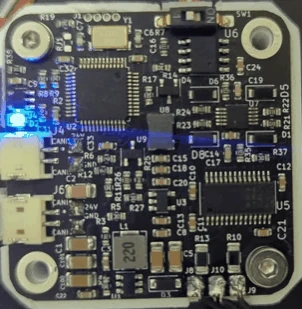 |
In error mode the LED does not flash: it stays on, as in the photo on the right.
The errors
| Error | #Error line |
Cause | What to do |
|---|---|---|---|
| Vbus | Vbus error |
the supply voltage is below 9 V or above #Vmax (29 V after #Default). From firmware 109 a low voltage is not checked for the first 500 ms after power-up, while the supply ramps up |
check the supply and the cable; a decelerating motor can push the voltage up |
| Encoder | Encoder error |
the magnet is not detected or the reading is invalid | magnet distance and type, see The encoder magnet |
| Driver | Drv error, and FAULT pin is LOW: the gate driver reports a fault while the fault lasts (firmware 107 and older printed FAULT pin is HIGH) |
the MOSFET driver's own protection tripped: undervoltage, thermal shutdown or overcurrent | lower the current limit, cool the driver, check for a short between the motor leads |
| Velocity | Velocity error |
the measured speed exceeded 20,000,000 ticks/s (about 1220 revolutions per second), a fixed limit that #Vlimit does not change |
a runaway or an encoder fault: check the magnet and the encoder, see The encoder magnet |
| Temperature | Temp error |
the thermistor reads more than #Tlim (75 °C by default) or less than −20 °C, with #Term 1 |
let the motor cool; lower the current limit |
| E-stop | Received ESTOP command |
Send_ESTOP was received, or from firmware 110 #Estop over UART |
clear it when it is safe |
| Watchdog | Watchdog error |
no motion command or answered request over CAN within the watchdog time (Send_Watchdog); what the motor does then is the watchdog's action, see The watchdog | the host stopped sending; fix the host, then clear. See The watchdog |
| Wrong product | Wrong firmware for this board (product lock) |
from firmware 109: this board was calibrated by the other product (a STEPFOC firmware on a Spectral Micro, or the other way round), so the firmware drives nothing (The product lock) | flash the right firmware; it does not clear otherwise |
| Not calibrated | Not calibrated |
the motor has not been calibrated since #Default, or the EEPROM is invalid |
run #Cal and #Save |
| Current | Current error |
reserved; this firmware never raises it | — |
Clearing
#Clear or Send_Clear_Error clears the flags and goes to idle. An error whose cause is still present comes
straight back: a Vbus error at 2 V stays until the supply is right; once the supply is 24 V, one #Clear returns
the driver to normal operation.
The calibration error clears only by calibrating (or, for a motor you know is calibrated, #Calibrated 1).
The watchdog
The watchdog is set with Send_Watchdog over CAN, or with parameters 6 (time) and 7 (action): over UART,
#Par 6,<ms> and #Par 7,<action>. It counts the motion commands (Send_data_pack_1, Send_data_pack_PD, Send_gripper_data_pack) and the requests
the driver answers (the Send_Respond_ remote frames, Send_Get_Parameter, Send_Buffer_Read).
Other CAN frames and UART commands do not reset it. Send_Save_config keeps it over a power cycle, like the heartbeat interval. What the driver does when it runs out is the watchdog's action (The watchdog).
A driver with a saved watchdog that is used over UART only, or by a host that sends no motion command, raises a
watchdog error each time the watchdog time runs out, also right after #Clear.
To turn it off, send Send_Watchdog with 0 and then Send_Save_config over CAN. Over UART, #Par 6,0 and then #Save
do the same; nothing else is changed.
When the driver does not answer
- No LED at all: no power. Check DC+ and DC− and the cable orientation.
- LED on, no answer on UART: the baud rate (256000), TX and RX crossed, the adapter's port.
- No answer on CAN: the node ID, the termination (about 60 Ω across the bus, unpowered), 1 Mbit/s on the adapter.
#Infoshows-1or nonsense: the EEPROM holds values the firmware does not expect, usually from an older release (see Saving the configuration);#Default, then calibrate again.
Troubleshooting goes through the symptoms one by one.
Comments
Found a mistake on this page? Edit it on GitHub · Report it · Get help · This page as Markdown · llms.txt · The whole manual as PDF