# Homing
After power-up the robot does not know where its joints are: the motors count steps, and the count starts at
zero wherever the arm happens to stand. Homing gives each joint a reference by driving it to its limit switch or
sensor, then moving a known number of steps to the after-homing pose. It must be done after every power-up, and again
after a collision, a stall or any move by hand.
## Before you press Home
- The arm can move freely to every limit: nothing on the table in the way, no cable caught.
- The tool is mounted: joint 5 homes against the tool's feature on the SSG-48 and the pneumatic gripper, and
the homing offset in the firmware matches the tool ([Joint 5 and the tool](https://docs.source-robotics.com/PAROL-docs/1.1/05-operation/mastering/#joint-5-and-the-tool),
[SSG-48](https://docs.source-robotics.com/PAROL-docs/1.1/end-effectors/ssg-48/)).
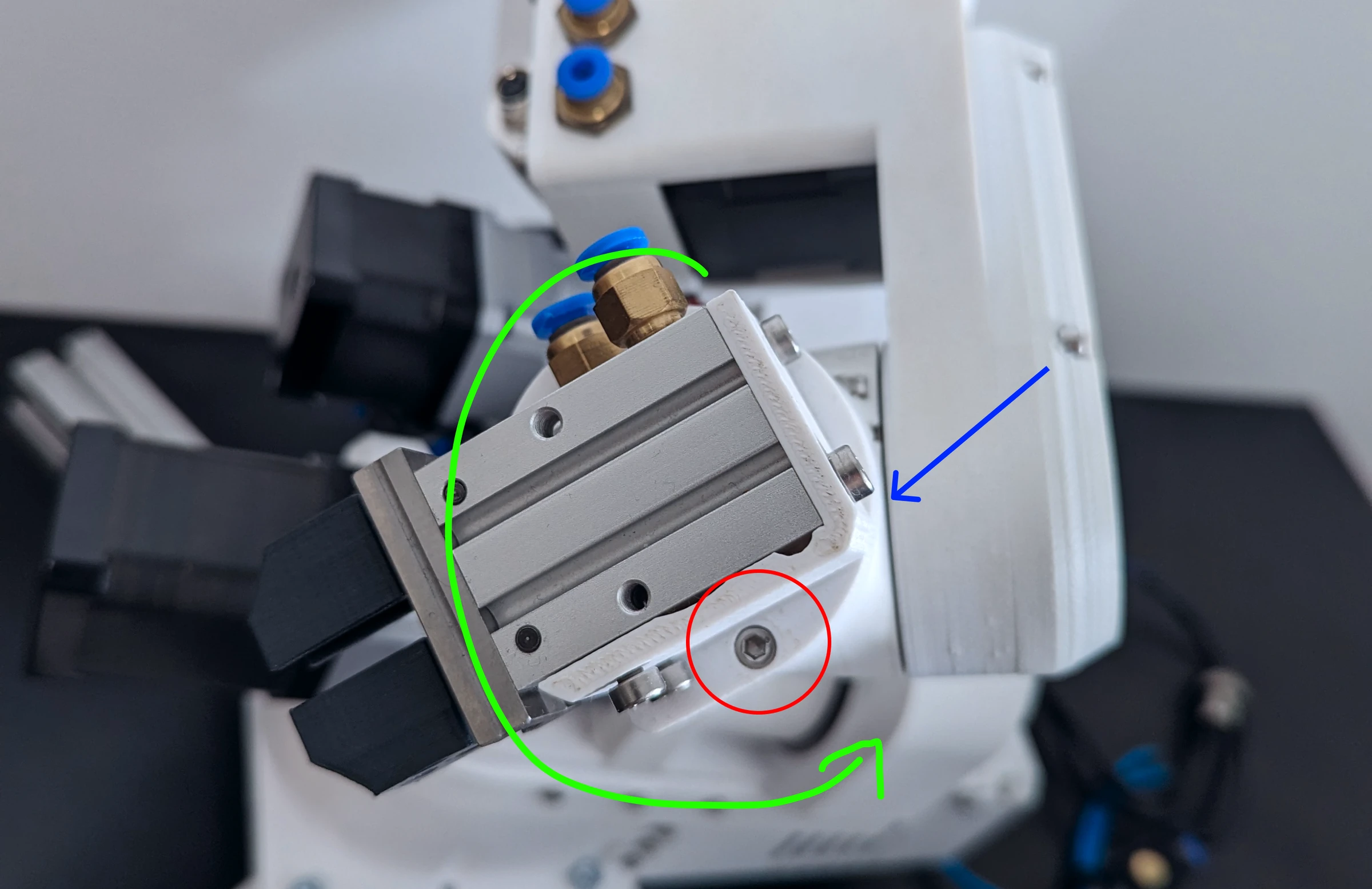
- Joint 6 stands so that it finds its sensor within one turn in the negative direction, with the cables and
tubes not already wound up. The figure shows the pose: the gripper as drawn, the sensor (blue) and the homing
pin (red); joint 6 turns along the green arrow.
- You are at the E-stop.
{ width="700" }
## The sequence
The firmware runs the sequence; the PC only starts it and watches.
```mermaid
flowchart TD
S([Home]) --> A[Joints 1, 2 and 3 drive together to their sensor and switches]
A --> B[Each backs off about a thousand steps and approaches again slowly:
the second trigger is the reference]
B --> C[Joints 1, 2 and 3 move to their after-homing positions]
C --> D[Joint 4: the same against its inductive sensor, then its after-homing position]
D --> E[Joint 6 turns in the negative direction until its sensor sees the pin,
backs off, re-approaches, moves on so that joint 5 can home]
E --> F[Joint 5 homes against its switch]
F --> G[Joints 5 and 6 move to their after-homing positions together]
G --> H([Every counter set to its after-homing value: six joints homed])
```
1. **Joints 1, 2 and 3 move together** toward their switches: joint 1 to its inductive sensor, joints 2 and 3 to
their limit switches. Each stops when it triggers.
2. Each backs off, 850 steps on joint 1 and 1050 on joints 2 and 3, and approaches again slowly, and the position
where it triggers the second time is the reference: the first hit may have pressed the switch too far.
3. Joints 1, 2 and 3 move from the reference to their after-homing positions (13500, 19588 and 23020 steps away).
4. **Joint 4** does the same against its inductive sensor (backing off 1550 steps) and moves to its after-homing
position.
5. **Joint 6** turns in the negative direction until its sensor sees the homing pin, backs off, re-approaches,
and moves on to the position from which joint 5 can home.
6. **Joint 5** homes against its switch, and joints 5 and 6 move to their after-homing positions together:
joint 5 by `j5_homing_offset`, joint 6 back to the point where its sensor triggered.
7. The firmware sets every joint's counter to its after-homing value (`standby_position` in the firmware), and
reports all six joints as homed.
A video of a correct homing: [Homing reference](https://www.youtube.com/watch?v=OCCQkIWPWwo). It takes about half
a minute. The result is the after-homing pose: the standby pose turned 90° about joint 1, with joint 1 at +90°
([Joint limits and directions](https://docs.source-robotics.com/PAROL-docs/1.1/03-technical-data/joint-limits/#standby-and-after-homing)).
=== "Commander software"
Press **Home**. The response log reports the joints as they home; the position display and the simulator are
right once all six are homed.
=== "Python API"
```python
rbt.home(wait=True)
```
The first `home()` after power-up runs the referencing sequence. A later `home()` on a referenced robot is a
planned, collision-checked joint move back to the after-homing pose; `home(calibrate=True)` runs the sequence again.
Planned motion is refused with `MOTN_NOT_HOMED` until the robot is referenced.
## If it goes wrong
Press the E-stop when a joint grinds at its end without stopping: its switch does not trigger. Joints 1, 4 and 6
use inductive sensors whose LED lights when they see metal; a sensor that does not light needs its trigger screw
adjusted. If joint 6 keeps turning, its homing pin is not where the sensor looks. [Homing failures](https://docs.source-robotics.com/PAROL-docs/1.1/08-troubleshooting/homing-failures/)
has the cases.
## Mastering
A homed robot stands within a few steps of the after-homing pose. The exact number of steps from each switch to the
witness marks differs between builds; [Mastering](https://docs.source-robotics.com/PAROL-docs/1.1/05-operation/mastering/) says how to measure and set it.