# MSG Gripper Manual
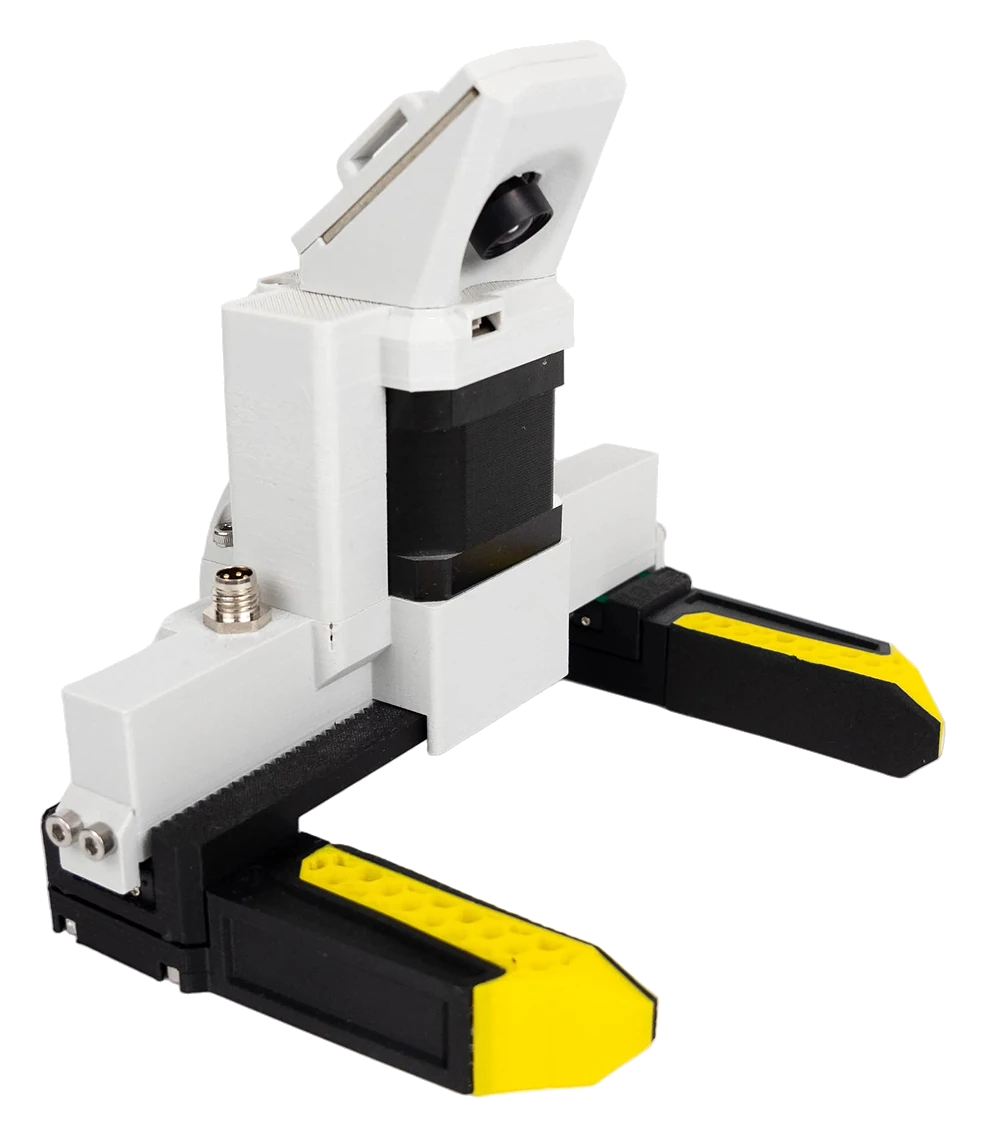
**Document number:** SR-5003
**MSG gripper release:** 1.2
**Firmware:** STEPFOC 108
**Revision:** 2026.B
**Published:** 2026-11-04
**Applies to:** MSG gripper release 1.2 with the STEPFOC driver PCB v1, STEPFOC firmware 108
*Original instructions*
[Quick start](https://docs.source-robotics.com/MSG-gripper-docs/1.2/quick-start/) [About this manual](https://docs.source-robotics.com/MSG-gripper-docs/1.2/about/)
Source Robotics d.o.o. publishes this document for the MSG compliant AI stepper gripper. It is revised as the gripper and its
firmware change; the document number, the gripper release, the firmware, the revision and the date above identify
the version you are reading, and the document history on the About page says what changed. The version selector
in the header switches between gripper releases. The gripper runs the STEPFOC driver's firmware: take care that
the firmware named under *Applies to* matches what the gripper reports. The text and the images are licensed
CC BY-SA 4.0, the code examples MIT.
**The MSG is open source, and that is important to us.** Everything the gripper is made of is published: the
CAD and print files, the bill of materials, the assembly instructions, the driver's firmware and the software that
drives it. Buy the gripper assembled, or build one yourself; change the jaws or the body for your application and
fit it to any robot. The [build guide](https://docs.source-robotics.com/MSG-gripper-docs/1.2/build/) is the order to do it in.
**Made for teleoperation and robot learning.** We designed the MSG specifically for teleoperation, VLA
(vision-language-action) training and physical intelligence. The camera on top of the body is placed with care:
it looks down between the jaws at an angle that keeps both jaws, and the object between them, in view, the
picture a teleoperator and a learning model need.
- :material-play-circle: **Quick start**
---
[One-page quick start](https://docs.source-robotics.com/MSG-gripper-docs/1.2/quick-start/): choose the cable, check the bus, connect Motor GUI, calibrate,
and make the first gentle open and close. Each step says what to check before continuing.
- :material-book-open-variant: **The manual**
---
[Safety](https://docs.source-robotics.com/MSG-gripper-docs/1.2/02-safety/), [Technical data](https://docs.source-robotics.com/MSG-gripper-docs/1.2/03-technical-data/), [Installation](https://docs.source-robotics.com/MSG-gripper-docs/1.2/04-installation/),
[First setup](https://docs.source-robotics.com/MSG-gripper-docs/1.2/05-setup/), [Operation](https://docs.source-robotics.com/MSG-gripper-docs/1.2/06-operation/), [Maintenance](https://docs.source-robotics.com/MSG-gripper-docs/1.2/07-maintenance/), [Firmware](https://docs.source-robotics.com/MSG-gripper-docs/1.2/08-firmware/),
[Troubleshooting](https://docs.source-robotics.com/MSG-gripper-docs/1.2/09-troubleshooting/).
- :material-robot-industrial: **On a robot**
---
[PAROL6 and PAR6](https://docs.source-robotics.com/MSG-gripper-docs/1.2/06-operation/robots/), [ROS 2](https://docs.source-robotics.com/MSG-gripper-docs/1.2/06-operation/ros2/), [Python](https://docs.source-robotics.com/MSG-gripper-docs/1.2/06-operation/python/):
the gripper from the robot's own software, from a ROS 2 node, or from your program over CAN.
- :material-code-braces: **API reference**
---
The gripper's [CAN messages](https://docs.source-robotics.com/MSG-gripper-docs/1.2/reference/can/) and [UART commands](https://docs.source-robotics.com/MSG-gripper-docs/1.2/reference/uart/), the
[status bits](https://docs.source-robotics.com/MSG-gripper-docs/1.2/reference/errors/) and the [Python library](https://docs.source-robotics.com/MSG-gripper-docs/1.2/reference/python/), read from the firmware.
- :material-hammer-wrench: **Open source: build your own**
---
[The build guide](https://docs.source-robotics.com/MSG-gripper-docs/1.2/build/): the repository's bill of materials, printing, the assembly, the driver's
setup and the first run. The same manual applies.